2. Demographics Section
This section contains patient demographics and accession data.

|
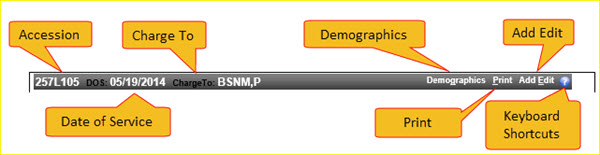
The navigation bar for the demographics section is shown below.
|
The navigation bar displays the Accession number, Date of Service and ChargeTo information. In addition, the navigation bar provides the functions listed below.
Demographics link, click on Demographics to expand, or collapse, this area to display a complete set of demographic information for this accession. The Demographics link is a toggle.
Print link, click on Print to print the worklist detail information.
Add Edit link, click on Add Edit to create a new edit on an accession. This link is typically used to add an edit such as “Supervisor Review” to an accession if and when you don't know how to work a particular accession. For example, you could add a “Supervisor Review” edit to the accession and type in a message such as "I don’t know how to translate this diagnosis code from ICD9 to ICD10." See the screenshot in the Add Edit section of this document.
Keyboard Shortcuts icon  , click on the blue question mark icon to see a list of keyboard shortcuts. See the screenshot in the Keyboard Shortcuts section of this document.
Demographics Area
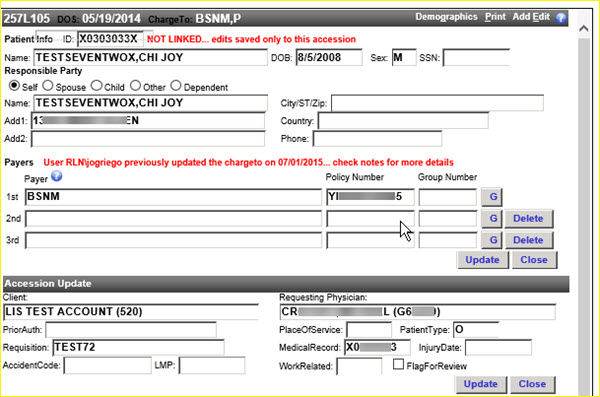
The demographics area of the worklist detail screen provides access to Patient Info, Responsible Party, Payers, and Accession data.
|
You may add and change data as needed on this screen.
Patient Fields Set
The patient set of fields includes: Patient ID, Name, DOB, Sex and SSN.
Change patient information as needed in this area. Click the Update button to save the changes you have made.
Responsible Party Field Set
The responsible party set of fields includes the radio button group: Self, Spouse, Child, Other, Dependent and the fields: Name, Add1, Add2, City/ST/Zip, Country and Phone.
Change the responsible party information as needed in this area. Click the Update button to save the changes you have made.