Scrub Book
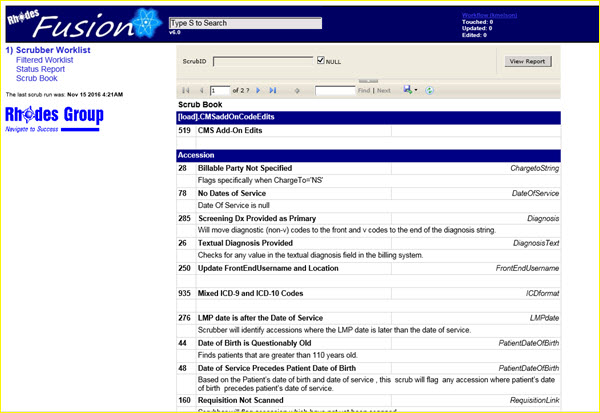
Click on the Scrub Book link to view scrub ID definitions.
|
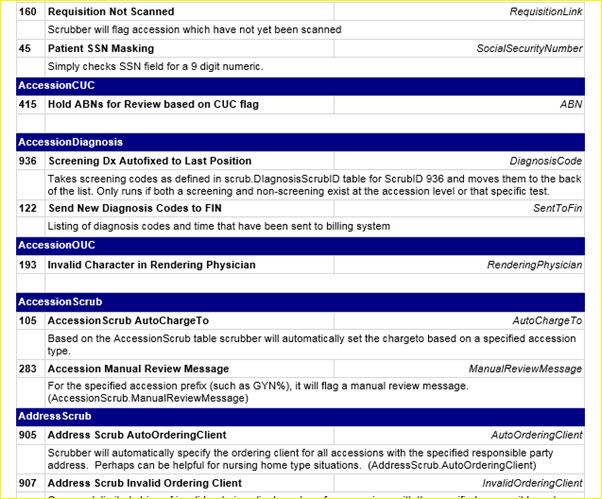
The scrub definitions are grouped by the table to which they apply. If available, the definition includes, in italics, the field name for the scrub parameters.
See the separate Scrub Book document for more information.
Another example of the definitions grouped by scrub table is shown below:
|
You may search the scrub definitions using the ScrubID parameter available in the search panel located above the Scrub Book report.

|
To find a specific ScrubID, if the NULL checkbox is checked, first uncheck the box, then you may enter the ScrubID.
Click the View Report button to display the scrub ID of interest.
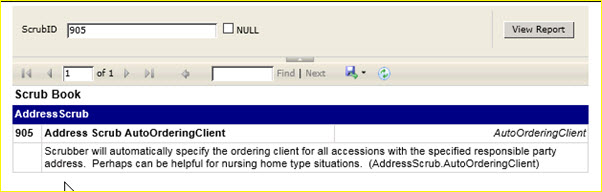
For example, a search and results for scrub ID 905 looks like this:
|
For Scrub ID 905, the scrub message is ‘Address Scrub AutoOrderingClient’. The table name and field name for this scrub is AddressScrub.AutoOrderingClient. The scrub definition is displayed below the scrub message.
To return to the complete list of scrubs, delete the scrub ID value, or check the NULL checkbox and click the View Report button.
See the Report Navigation and Filter Tool Bar section in this manual for more information on the report tool bar.